Lab 3: Media Transcoding
AWS Elemental MediaConvert
AWS Elemental MediaConvert is a file-based video processing service that provides scalable video processing for content owners and distributors with media libraries of any size. MediaConvert offers advanced features that enable premium content experiences, including:
- Professional broadcast codecs that support increased bit depth and HDR content creation
- Still graphic overlays
- Advanced audio
- Digital rights management (DRM)
- Closed captioning & subtitle support
- Frame rate conversion
- Clipping and stitching
AWS Elemental MediaConvert offers support for various input formats and adaptive bitrate (ABR) packaging output formats for delivering high-quality content from a range of sources onto primary and multiscreen devices.
What are MediaConvert Use Cases?
You can use MediaConvert via the AWS Console to create individual transcoding jobs, but many customers integrate directly into their application by utilizing the MediaConvert API and other AWS services such as Amazon EventBridge, AWS Lambda, and Amazon API Gateway.
Understanding the anatomy of a MediaConvert Job
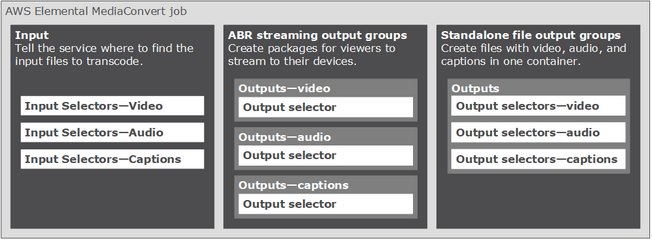
An AWS Elemental MediaConvert job does the work of transcoding media files into packages and files in various formats and sizes for distribution to end viewers.
When you create a job, you specify the information that the service requires to perform the transcoding: which file to use as the source, which types of files to create, where to store the files, which encoding settings to use, and which advanced features to apply.
To set up a job, you define:
- input files for the service to transcode (video, audio, and captions)
- you specify the types of output files and packages that you want AWS Elemental MediaConvert to generate from the input
- You also specify the detailed encoding settings to produce the quality and type of output that you want
The following illustration shows the anatomy of a MediaCovert job.
The following url link will provide access to more information and specs on AWS Element MediaConvert:
https://docs.aws.amazon.com/mediaconvert/latest/ug/what-is.html